

This post was cowritten with Satabrata Paul and Karan Singh Thakur from Atlan
In this post, we show you how to unify governance and metadata across Amazon SageMaker Unified Studio and Atlan through a comprehensive bidirectional integration. You’ll learn how to deploy the necessary Amazon Web Services (AWS) infrastructure, configure secure connections, and set up automated synchronization to maintain consistent metadata across both platforms.
As organizations scale their data and AI programs, teams often work across distributed tools such as governance solutions for business users and analytics or machine learning (ML) environments for technical teams. Without tight integration between these systems, metadata becomes fragmented. A single asset can appear under different names, documentation might drift out of sync, and governance signals can become inconsistent across systems.
To address these challenges, Atlan, a modern data workspace that makes collaboration among diverse users like business, analysts, and engineers easier, increasing efficiency and agility in data projects, and AWS have built a bidirectional integration between Atlan and Amazon SageMaker Unified Studio. This integration creates a continuous connection between both environments so every team within the enterprise can work with a single, trusted, and synchronized view of metadata for their data and AI assets. By bridging the gap between diverse users collaborating in Atlan and technical teams working within Amazon SageMaker Unified Studio for analytics and ML, this integration maintains consistency across both platforms without requiring teams to switch contexts or manually reconcile metadata differences.
Why unified metadata governance matters
Enterprises today operate in hybrid environments. Business users rely on Atlan as an active metadata solution to manage, govern, and collaborate on data assets across the modern data stack. Atlan helps teams find, understand, and trust their data so they can use it effectively to drive business outcomes.
Organizations also use Amazon SageMaker Catalog to simplify the discovery, governance, and collaboration for both business and technical data across structured and unstructured sources. Teams can use the catalog to organize data products, capture context, and apply governance policies consistently within Amazon SageMaker Unified Studio.
This new integration synchronizes metadata between SageMaker Catalog and Atlan, maintaining consistency and keeping content current across both environments. With a unified view, every team within the enterprise can work confidently with a single, trusted representation of their data and AI assets.
Solution overview
The solution follows a phased rollout strategy to provide you with immediate value while progressively expanding toward comprehensive data and AI governance capabilities. The current phase focuses on establishing secure, scalable, and reliable metadata synchronization between Atlan and Amazon SageMaker Unified Studio.
The Phase 1 integration between Amazon SageMaker Catalog and Atlan enables both on-demand and scheduled bidirectional metadata synchronization across the two solutions. It uses the standard APIs of Amazon SageMaker Unified Studio and Atlan to create a scalable and configurable mechanism for metadata exchange. Key capabilities include:
- Secure connection using IAM roles – The integration is established through a controlled AWS Identity and Access Management (IAM) based handshake. A predefined AWS CloudFormation template automatically provisions the IAM role and policies required to enable a secure, least-privilege connection between Amazon SageMaker Catalog and the Atlan application.
- On-demand and scheduled synchronization – The integration supports both manual and automated metadata synchronization. API-driven workflows manage the exchange of glossary terms, asset descriptions, and classifications in both directions, keeping metadata consistent across systems.
After you’ve implemented Phase 1, you can perform bidirectional synchronization of glossary terms and descriptions between Amazon SageMaker Unified Studio and Atlan. This keeps your terminology consistent across both platforms, and your teams can maintain a single source of truth for business definitions. The integration also preserves your glossary structures, including parent-child relationships, so your carefully organized taxonomy remains intact during the sync process. Additionally, glossary terms are automatically associated with related data assets, saving you the manual effort of linking terms to the appropriate datasets and reducing the risk of inconsistencies.
Beyond glossary management, Phase 1 enables comprehensive ingestion of assets and metadata from Amazon SageMaker Unified Studio into Atlan. This includes your projects, both published and subscribed assets, domains and data products, glossaries and terms, metadata forms, and column descriptions. By bringing this information into Atlan, you create a unified view of your data landscape that makes it easier for data consumers to discover, understand, and trust the data they’re working with.
Prerequisites
To follow along with this integration setup, you must have the following resources already configured in your environment:
- An Atlan tenant
- A Node group IAM role
- An Amazon SageMaker Unified Studio domain.
- At least one Amazon SageMaker Unified Studio project with assets created and glossary terms defined.
- Atlan API Token. You can generate this by navigating to API access under the Atlan’s Admin center.
- Atlan top-level glossary. You can create this glossary container on Atlan to ingest SageMaker Unified Studio glossaries and terms.
The next section offers a step-by-step walkthrough of the integration, from initial setup to full operation. It demonstrates how you can establish the trust handshake between Amazon SageMaker Unified Studio and Atlan and how bidirectional synchronization functions in practice.
Setup on AWS
To begin the integration, you need Atlan’s Account Node Instance IAM role. This role allows the Atlan SageMaker Unified Studio application to securely assume the IAM role that you will create in your AWS account using an AWS CloudFormation template. The trust relationship between these two roles authorizes Atlan to publish metadata to Amazon SageMaker Catalog and to perform reverse synchronization from AWS back into Atlan.
The IAM policy follows the principle of least privilege, granting Atlan access only to the resources necessary for cataloging and governance. This approach maintains accurate metadata synchronization while preserving your existing cloud security and compliance controls.
Follow AWS best practices when configuring trust relationships. These cross-account access mechanisms require careful management and monitoring, particularly during security incidents. For comprehensive guidance on securing IAM roles and trust policies, refer to the Security best practices in IAM and Require workloads to use temporary credentials with IAM roles to access AWS.
Contact your Atlan administrator to obtain the Amazon Resource Name (ARN) of the Atlan Account Node Instance IAM role. You will need this value when configuring the CloudFormation stack in AWS.
The next step is to create an AWS IAM role using the provided CloudFormation template. This role establishes the trust relationship between your Amazon SageMaker Unified Studio environment and your Atlan tenant. Follow these steps:
- Access the CloudFormation template. The CloudFormation template is currently available as a YAML file.
- On the AWS Management Console, navigate to CloudFormation and choose Create stack, then choose With new resources (standard), as shown in the following screenshot.

- Choose the provided CloudFormation template and choose Next.

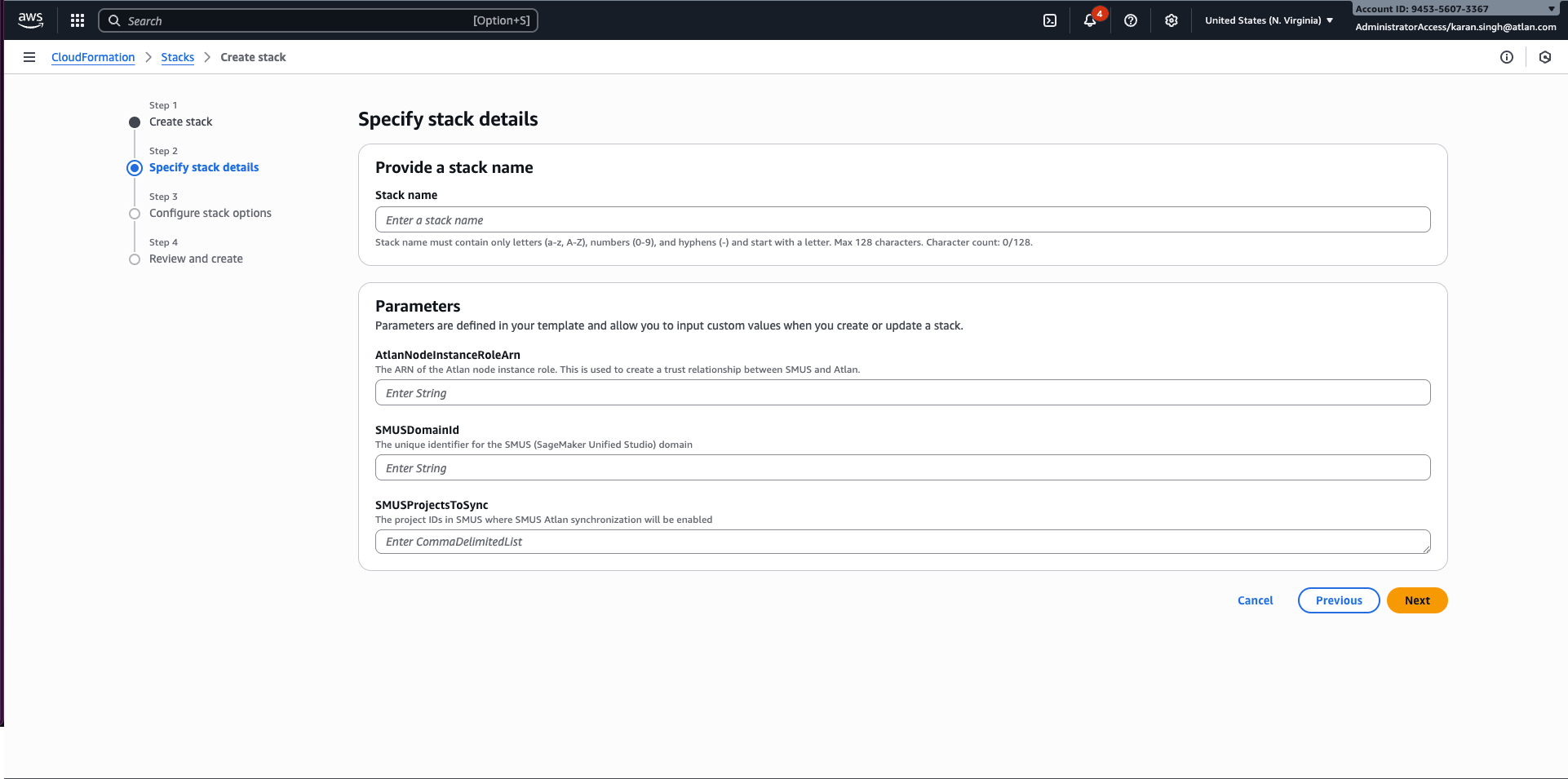
- Enter a name for the stack and complete the required parameters, as shown in the following screenshot:
- AtlanNodeInstanceRoleArn – The ARN of the Atlan node instance role.
- SMUSDomainId – The unique identifier for the SageMaker Unified Studio domain.
- SMUSProjectsToSync – The project IDs where SageMaker Unified Studio and Atlan synchronization will be enabled. You can choose to either add the project IDs and keep updating this stack every time a Project is added or add the created IAM role to each project as owner.
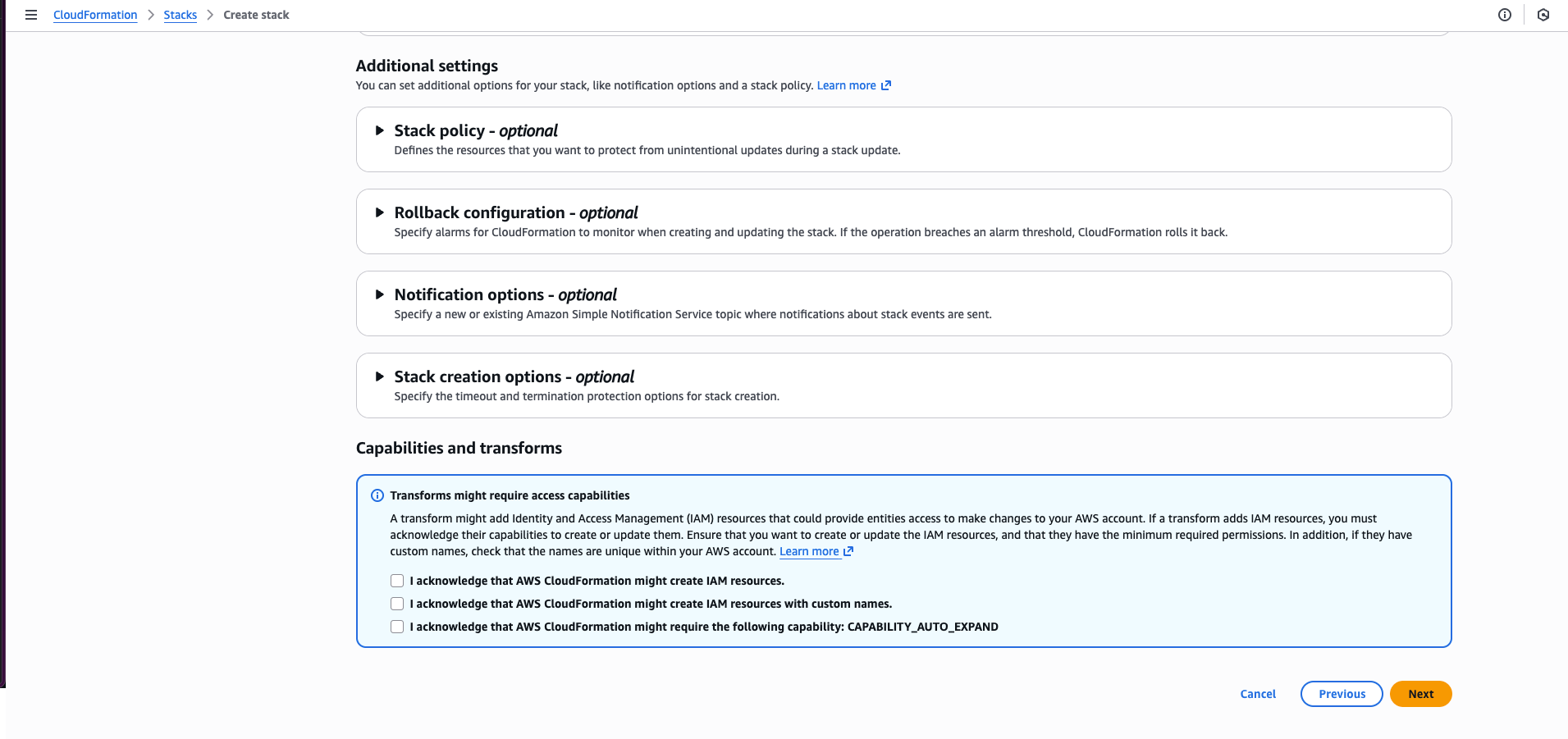
- Select the acknowledgement checkbox and choose Next, as shown in the following screenshot.
- Choose Submit to start the stack deployment. When the process is complete, the stack status will update to
CREATE_COMPLETE. - Note the IAM role ARN
- After the CloudFormation stack has been deployed and the IAM role has been created, copy the IAM Role ARN from the CloudFormation output. You will need this value during the configuration process on the Atlan side to establish the secure connection between your Amazon SageMaker Unified Studio environment and your Atlan tenant.
Setup on Atlan
Now that you’ve deployed the necessary AWS resources, you’ll configure Atlan to establish the connection with Amazon SageMaker Unified Studio. This involves setting up the API token, configuring the IAM role, and creating the glossary container that will receive your synchronized metadata. Follow these steps:
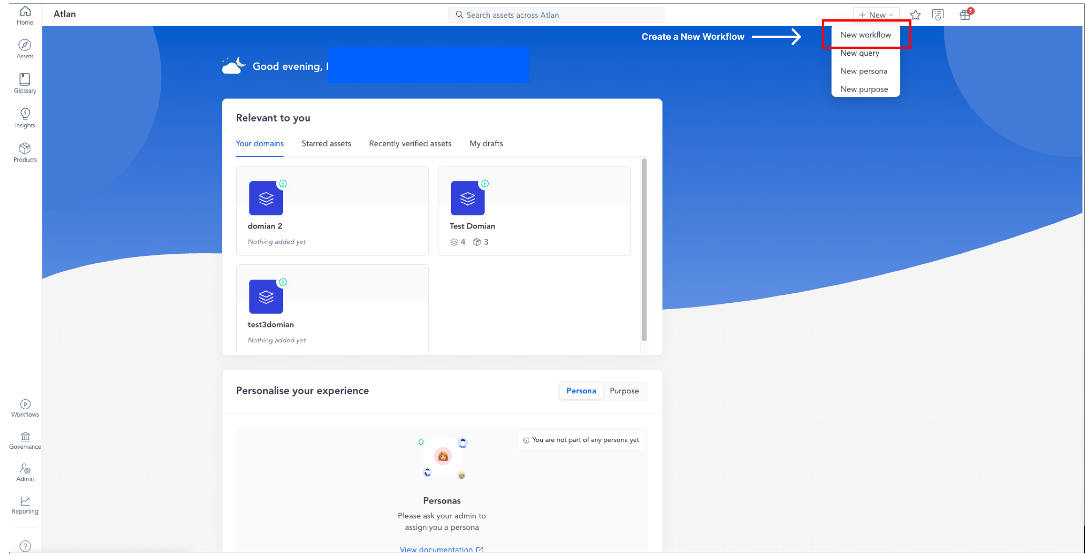
- Sign in to your Atlan tenant, as shown in the following screenshot.

- On the New dropdown menu, choose New workflow.
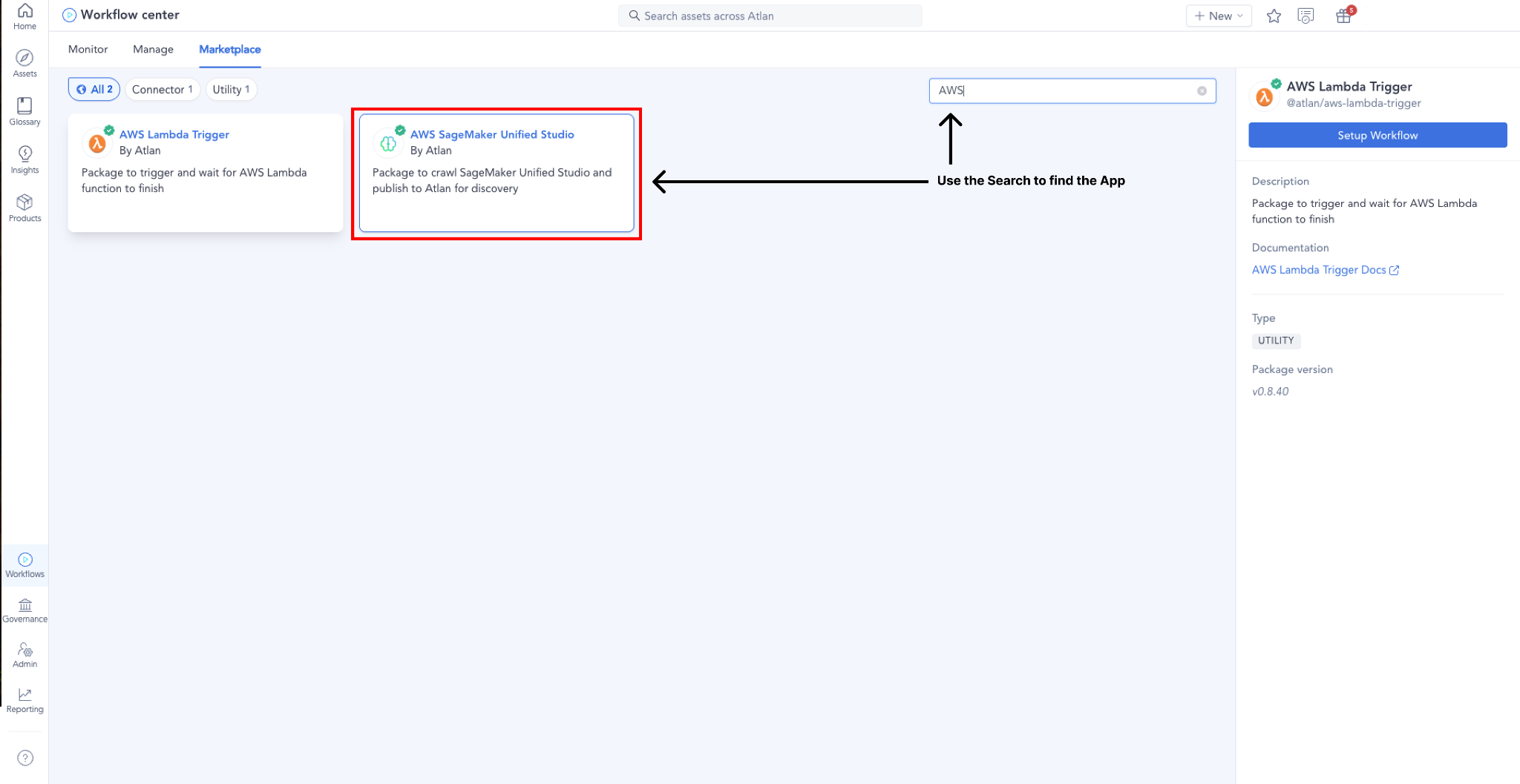
- On the Marketplace tab, search for and select the AWS SageMaker Unified Studio app, as shown in the following screenshot.
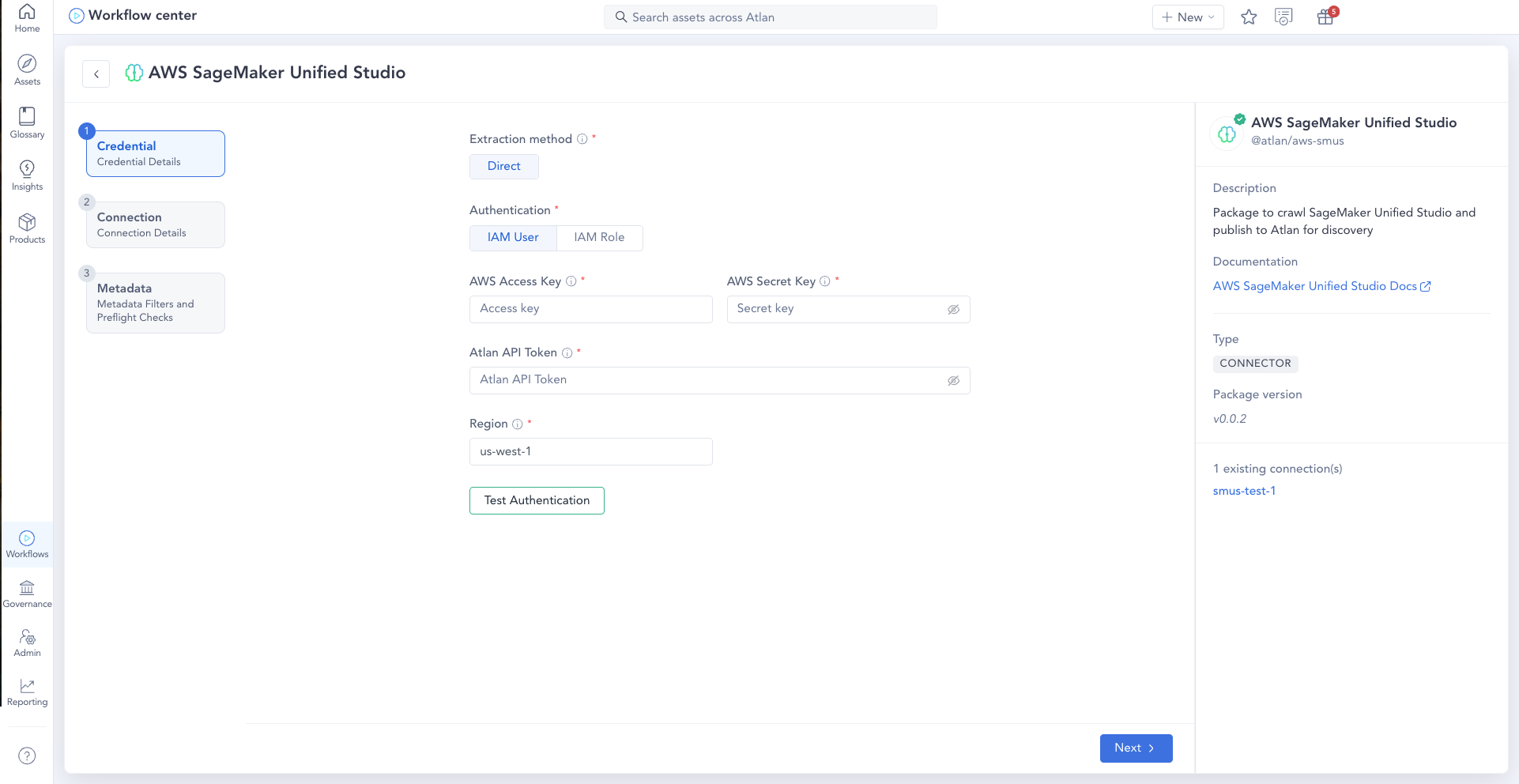
- Enter credential details. Use the IAM role or user created by the CloudFormation template before, enter an API token, and choose your AWS Region, as shown in the following screenshot.
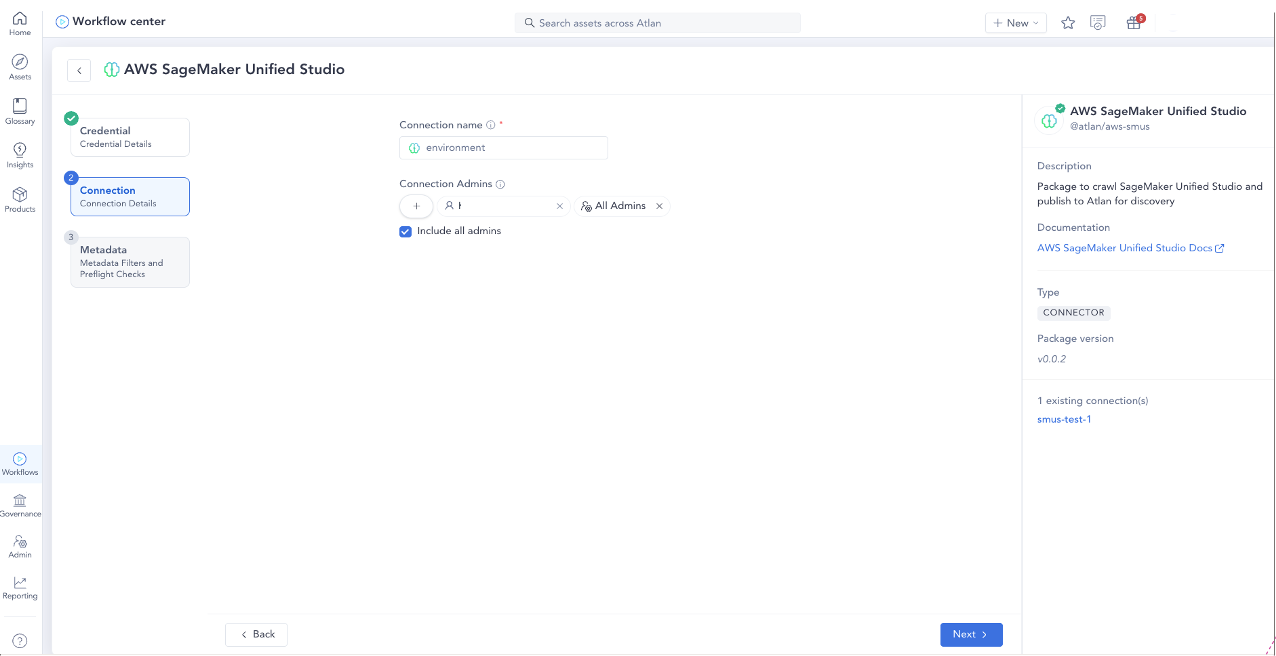
- Enter connection details. In Connection name, enter a name. Under Connection Admins, choose the plus icon to add members (other users) to the connectors as admins. Assigning admin permissions to the connection allows these users to:
- View and edit the assets in the connection.
- Edit connection preferences.
- Edit persona-based policies for the connection.
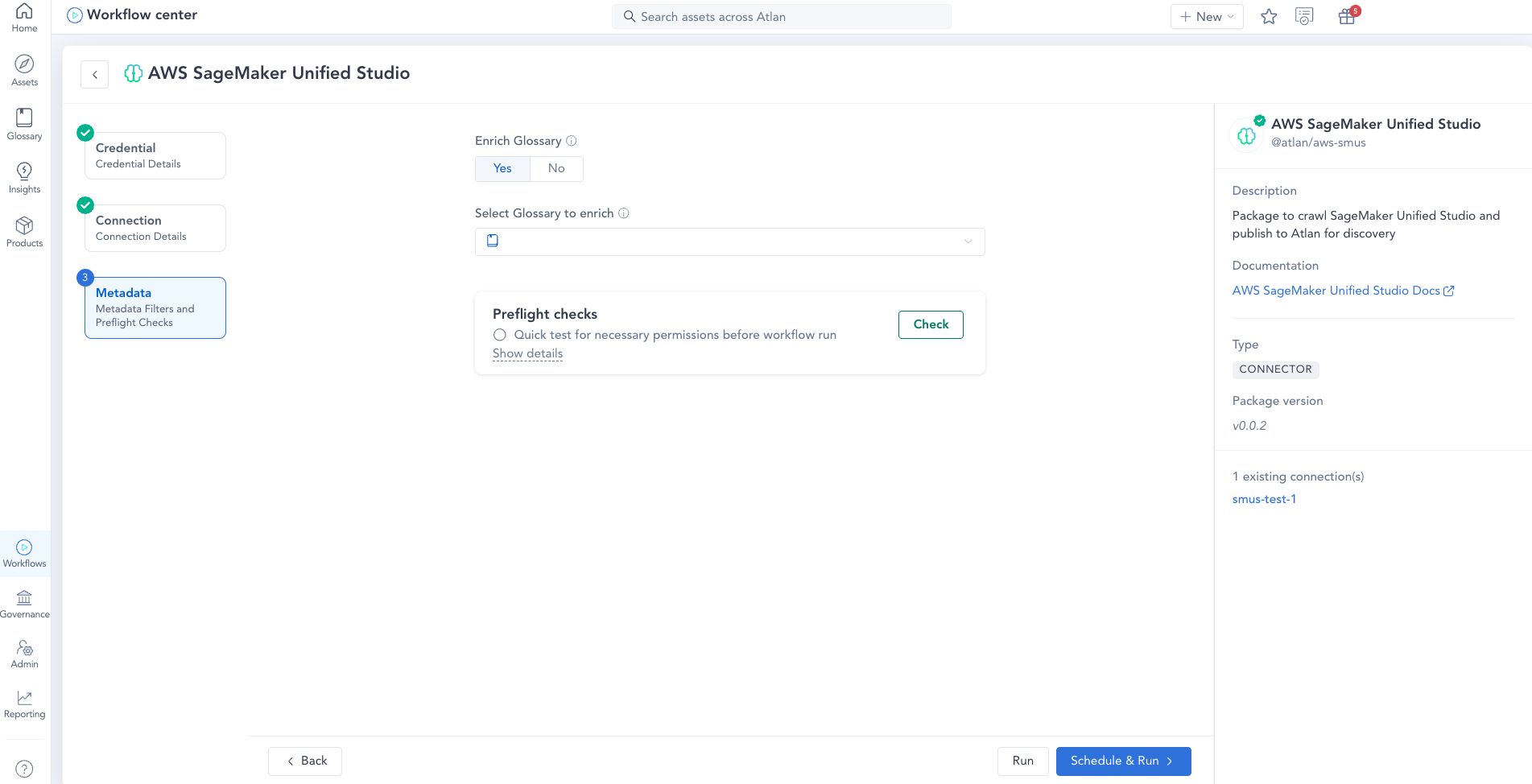
- Choose metadata filters and preflight checks, as shown in the following screenshot:
- In the Select Glossary to enrich dropdown menu, choose the glossary container in Atlan to be enriched with glossaries and terms from Atlan.
- To check for necessary permissions required to run the workflow, select Quick test for necessary permissions before workflow run.
- To run the workflow, choose Run. To schedule it to run later, choose Schedule & Run.
Synchronization of metadata
Now that you’ve configured the integration between Atlan and Amazon SageMaker Unified Studio, let’s explore how metadata flows bidirectionally between both platforms to maintain consistency and governance across your data landscape.
The Atlan SageMaker Unified Studio connector uses a bidirectional synchronization model that keeps business context and technical metadata consistent across both solutions. The process delivers reliability, traceability, and governance-safe updates, regardless of where changes originate. The following diagram illustrates the solution architecture.
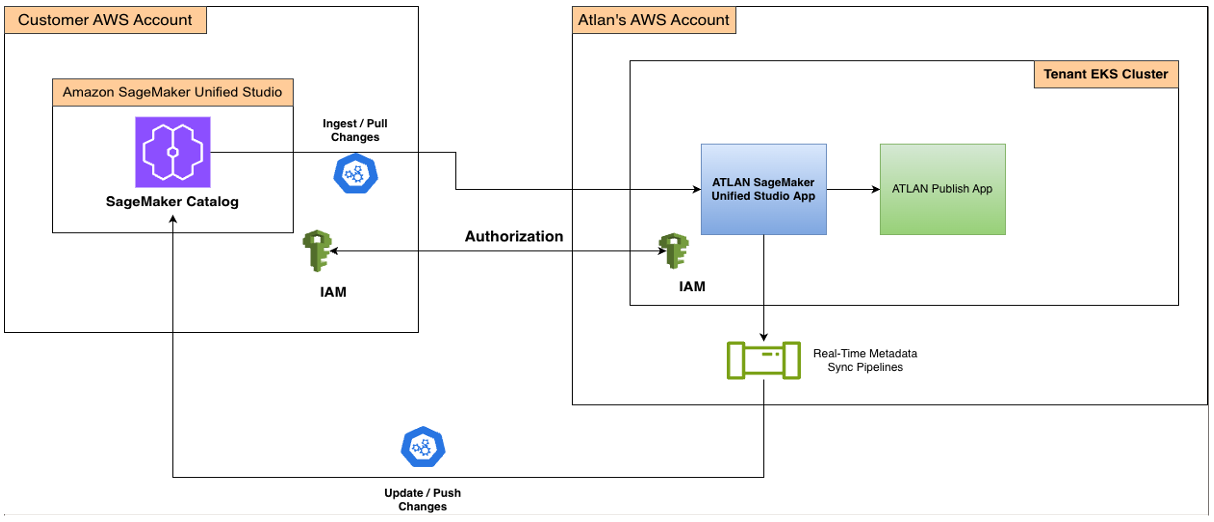
Sequential workflow for the SageMaker Unified Studio Atlan integration
The integration between SageMaker Unified Studio and Atlan follows a carefully orchestrated sequential workflow that enables seamless metadata synchronization across both platforms.
The process begins with connection setup through IAM, where authentication and authorization are configured to establish secure access between the customer’s AWS account and Atlan’s AWS environment. This foundational security layer allows subsequent data exchanges to occur within a trusted framework.
After the connection is established, the metadata sync workflow can be triggered either on a defined schedule or manually by the user, providing flexibility based on organizational needs. When triggered, the Atlan SageMaker Unified Studio app calls the SageMaker Unified Studio APIs to ingest assets and metadata from the source system.
The ingested assets then undergo processing and transformation within Atlan, where they are converted into Atlan’s metadata model. This processing step is crucial because it makes the assets discoverable, searchable, and governable inside the Atlan platform, which means teams can use Atlan’s full governance capabilities.
A key capability of this integration is its real-time reverse sync for metadata updates. When a user modifies metadata for the assets inside Atlan (such as adding tags or updating descriptions), Atlan’s real-time reverse sync pipelines immediately detect these changes and push the updates back to SageMaker Unified Studio. This keeps SageMaker Unified Studio reflecting the most up-to-date metadata entered by users in Atlan, eliminating the risk of metadata drift between systems.
This bidirectional sync creates a continuous loop where metadata flows from SageMaker Unified Studio to Atlan for ingestion and publication, simultaneously flowing back from Atlan to SageMaker Unified Studio through real-time reverse sync. The result is a consistent, bidirectional metadata flow that keeps both platforms synchronized. Teams can work confidently knowing that their metadata governance efforts are reflected across their data.
The following diagram illustrates this complete workflow, showing how metadata moves through each stage of the integration from initial IAM authentication through the continuous bidirectional sync loop that maintains metadata consistency across both platforms.
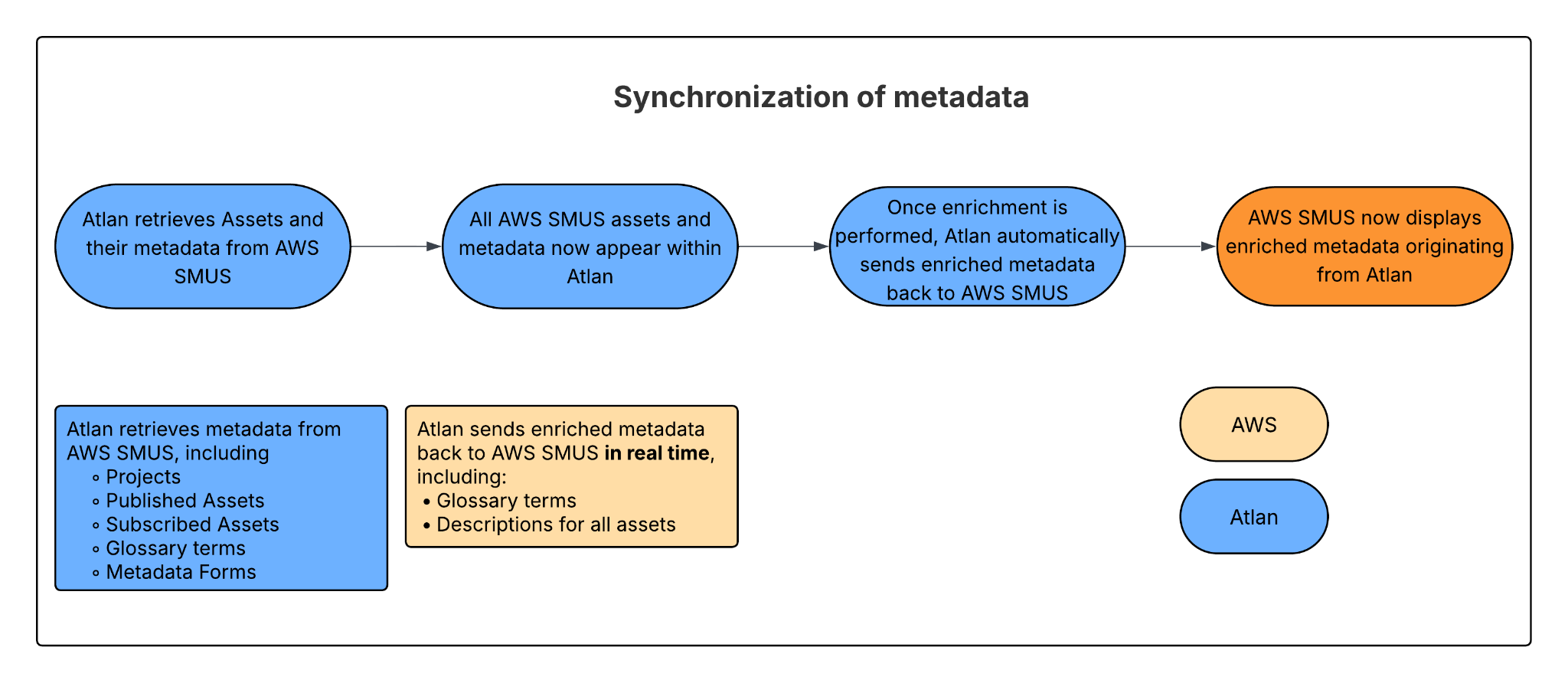
SageMaker Unified Studio to Atlan: Ingestion of metadata
The Atlan-SageMaker Unified Studio App periodically connects to SageMaker Unified Studio using secure API calls to ingest metadata. This metadata is transformed and mapped into Atlan’s metadata model, then published through the Atlan publish app as new or updated assets.
Each ingestion cycle is fully logged by Atlan’s audit service, which captures timestamps, correlation IDs, and the full change record. These logs support deduplication, troubleshooting, and replay in the event of partial failures.
Atlan to SageMaker Unified Studio: Synchronizing enriched business context
When users enrich assets inside Atlan, for example by updating descriptions or attaching glossary terms, the integration detects these changes and selectively pushes them back to SageMaker Unified Studio.
The reverse sync control plane is a pipeline that automatically detects changes made to assets and then triggers SageMaker Unified Studio Update API calls in the background to keep everything synchronized.
What’s next?
Phase 1 delivers core metadata synchronization and principal catalog selection for immediate consistency across your data governance platforms. Phase 2 will synchronize lineage and data quality, so teams see the same data flows and quality signals in both Atlan and SageMaker Catalog, enabling end-to-end visibility into how data moves through your pipelines and maintaining quality metrics consistently tracked across both systems. Phase 3 will add integrated approval workflows to streamline how access is requested and granted across solutions, reducing friction for data consumers while maintaining robust governance controls. These upcoming phases build toward a fully connected governance experience, keeping metadata, lineage, quality, and access policies aligned across the modern data stack.
Cleanup
If you no longer need the SageMaker Unified Studio connector integration, complete the following steps to clean up your environment and avoid unintended resource usage:
- Delete the CloudFormation stack. Navigate to the AWS CloudFormation console, locate the stack deployed for this solution, and choose Delete. This action removes the AWS resources provisioned by the stack, including IAM roles, policies, and supporting components.
- Remove the connection in Atlan. Visit Delete a connection to follow the steps outlined in Atlan’s documentation to delete the associated connection.
Cleaning up these components keeps your AWS and Atlan environments streamlined, secure, and cost-efficient.
Conclusion
In this post, you learned how to establish a bidirectional integration between Atlan and Amazon SageMaker Unified Studio that unifies metadata governance across your data and AI environments. You walked through deploying the necessary AWS infrastructure using CloudFormation, configuring the secure IAM based connection, and setting up bidirectional synchronization to keep glossary terms, descriptions, and governance context aligned across both platforms.
Organizations can use this integration to connect business and technical users within a single governance framework, creating a consistent, trusted view of data across the enterprise. With one secure configuration, teams can synchronize metadata between Atlan and Amazon SageMaker Unified Studio, establishing a reliable foundation for innovation, collaboration, and responsible AI at scale.
About the authors

